BURGER CLUB
BURGER CLUB Self-service · fast food
In production · Kiosk + Admin + iiko

A queue is
not an option.

A turnkey self-service software suite: vertical kiosk + admin panel + server + iiko integration + payment, fiscalization and loyalty APIs. A guest builds an order in 90 seconds, the restaurant doesn't hire an extra cashier.

B Orders today 1,847 ▲ +12/hr
Client
Burger Club
Niche
Fast food
Format
Vertical kiosk
Scope
Turnkey
BURGER · CLUB
BURGER · CLUB
BURGER · CLUB
Order ready
#974 · dine-in
iiko · sync ok 147 items · live
Scroll
SELF-SERVICE KIOSK ADMIN PANEL iiko / ICA INTEGRATION NFC PAYMENT FISCAL API LOYALTY 5×6 MENU 32" · 40" · 55" KIOSK-MODE SELF-SERVICE KIOSK ADMIN PANEL iiko / ICA INTEGRATION NFC PAYMENT FISCAL API LOYALTY 5×6 MENU 32" · 40" · 55" KIOSK-MODE
Order steps
6
Time per order
90 sec
Menu grid
5 × 6
Screen sizes
32 · 40 · 55″
External APIs
5
System parts
modules
How it started

The pain
we solved

During peak hours a queue formed at the till, cashiers made mistakes in orders and the catalog, promos and bonuses worked only via a call to the manager. The menu in iiko and at the tills lived separate lives — manual sync, at night.

Before us Bottleneck
  • ×
    Queue & cashier bottleneck. At peak hours the cashier physically couldn't keep up — the guest left.
  • ×
    Manual order entry — errors in modifiers, confusion between "takeaway / dine-in".
  • ×
    Menu not synced. Prices in iiko and at the tills diverged — recalculations, conflicts with stop-lists.
  • ×
    Loyalty via a call to the manager. No instant points redemption.
  • ×
    No kiosk analytics. What sells, at what hours, the average check — unknown.
After us Throughput
  • 4–6 kiosks per location cover peak throughput without hiring cashiers.
  • 90-second UX from "dine-in / takeaway" to the order number. A 5×6 grid = up to 30 items without scrolling.
  • One-click sync with iiko. Menu, modifiers, stop-lists, prices — a single source of truth from the restaurant system.
  • Loyalty by phone number — balance, redemption, accrual, all on the kiosk screen.
  • Architecture ready for payment, fiscalization and loyalty APIs — the provider changes with a single config.
User journey · 6 steps

90 seconds
from entrance to order number

Six sequential screens — a linear, non-branching path. No extra buttons, no "back to cart", no "register first". A first-time guest who doesn't speak the language and is in a hurry manages on their own.

1
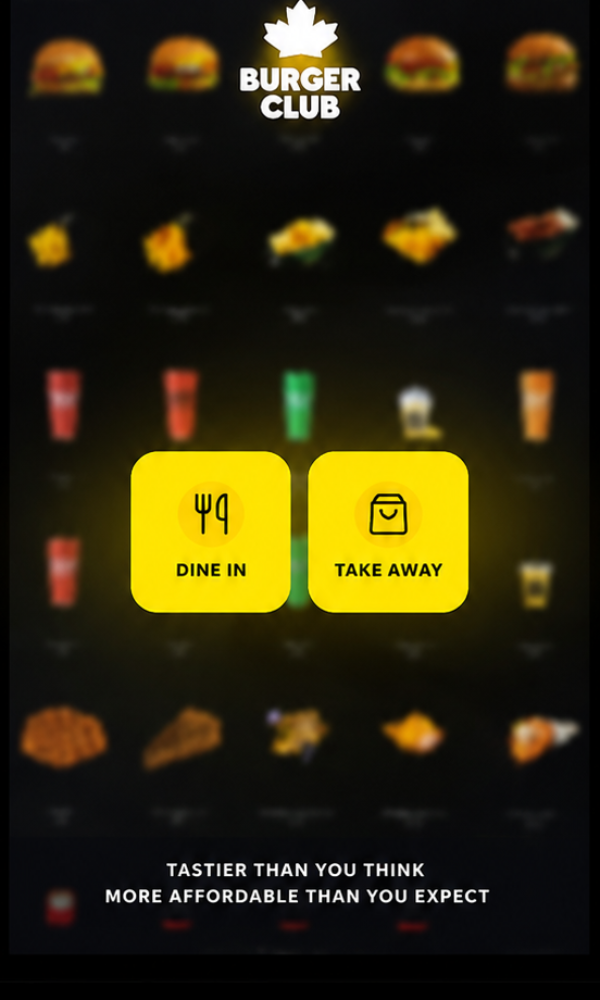
Start screen
BURGER · CLUB
Step 01 · Start
Dine-in or takeaway
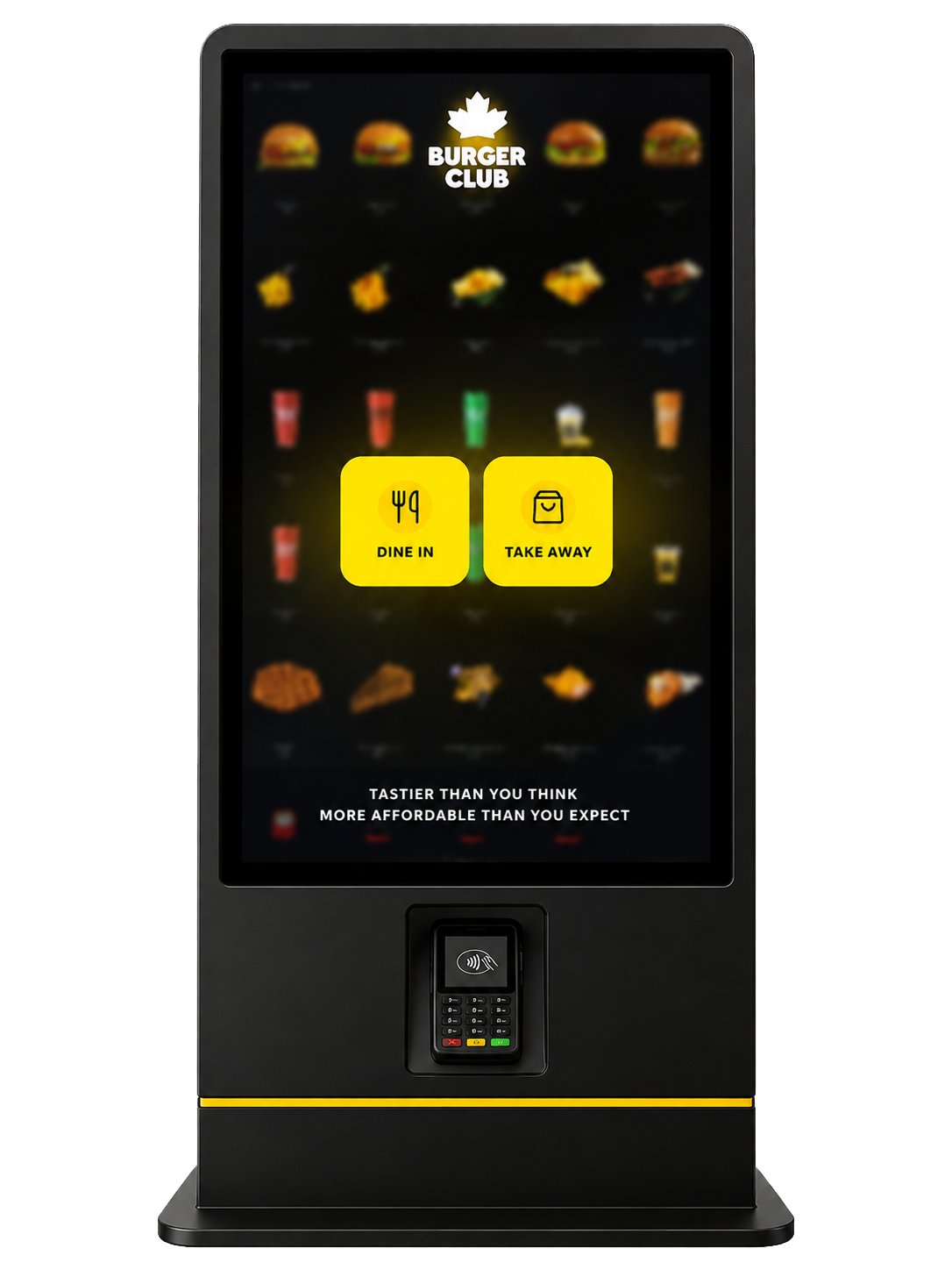
Start screen with branding and two large yellow buttons. A decision in 2 seconds.
2
Menu
BURGER · CLUB
Step 02 · Menu
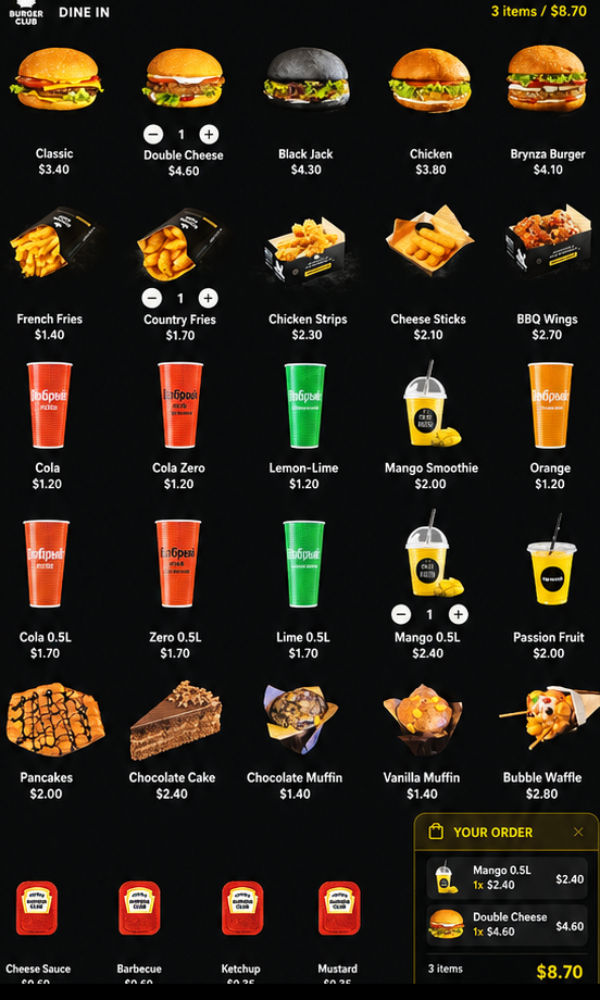
5×6 grid, up to 30 items on screen
Burgers, snacks, drinks, desserts, sauces — photo, price in USD. The cart is always at the bottom right.
3
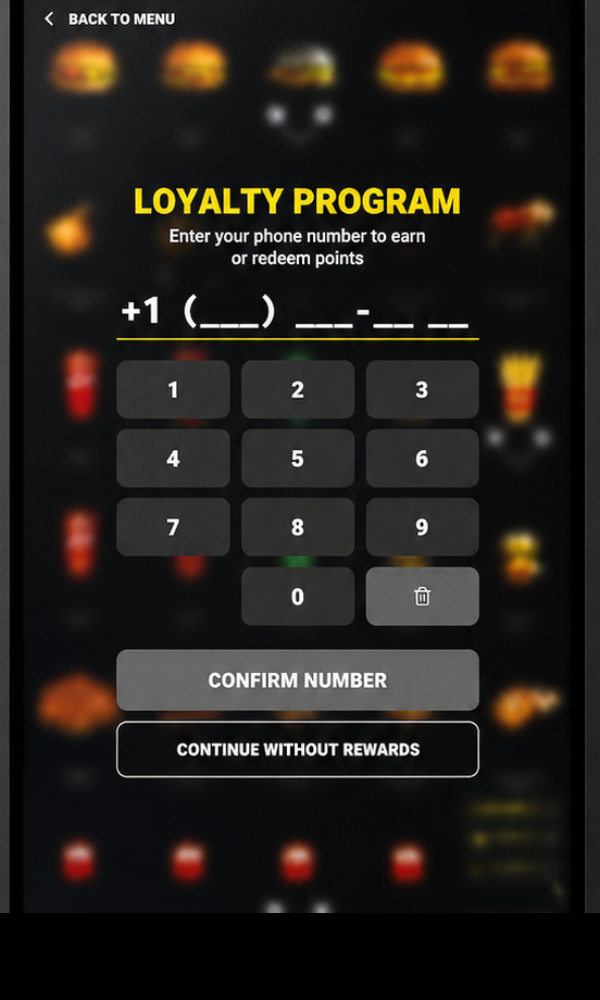
Loyalty phone
BURGER · CLUB
Step 03 · Loyalty
Phone number — points
Authorization by phone. You can continue without the program — one tap.
4
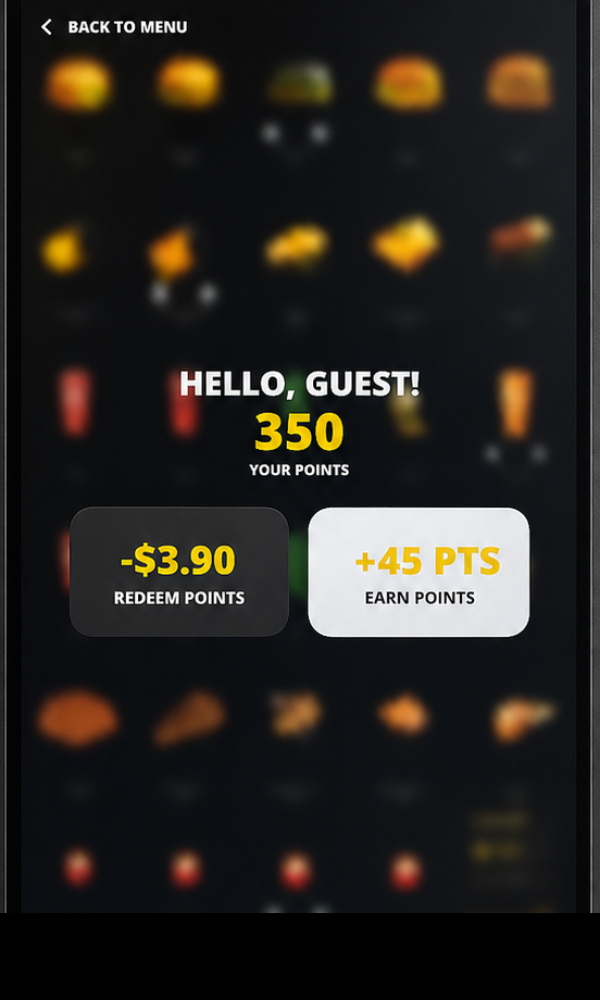
Loyalty hello
BURGER · CLUB
Step 04 · Bonuses
Hello, "name". 350 points
Personal greeting, current balance, choice: redeem or accrue.
5
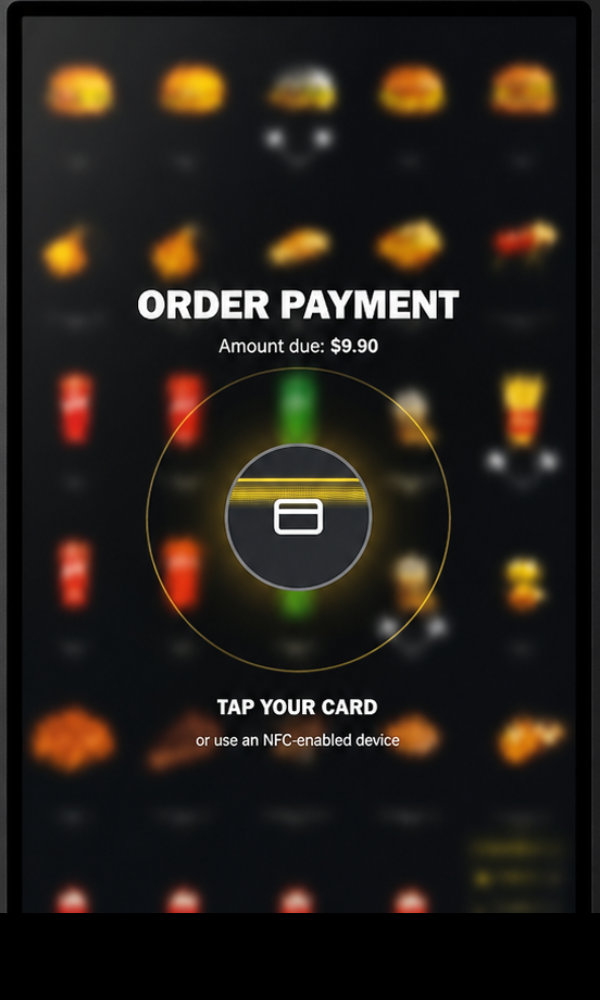
Payment
BURGER · CLUB
Step 05 · Payment
Tap your card · NFC
The amount shown large. A visual NFC zone. Success / decline / error scenarios covered.
6
Order number
BURGER · CLUB
Step 06 · Order number
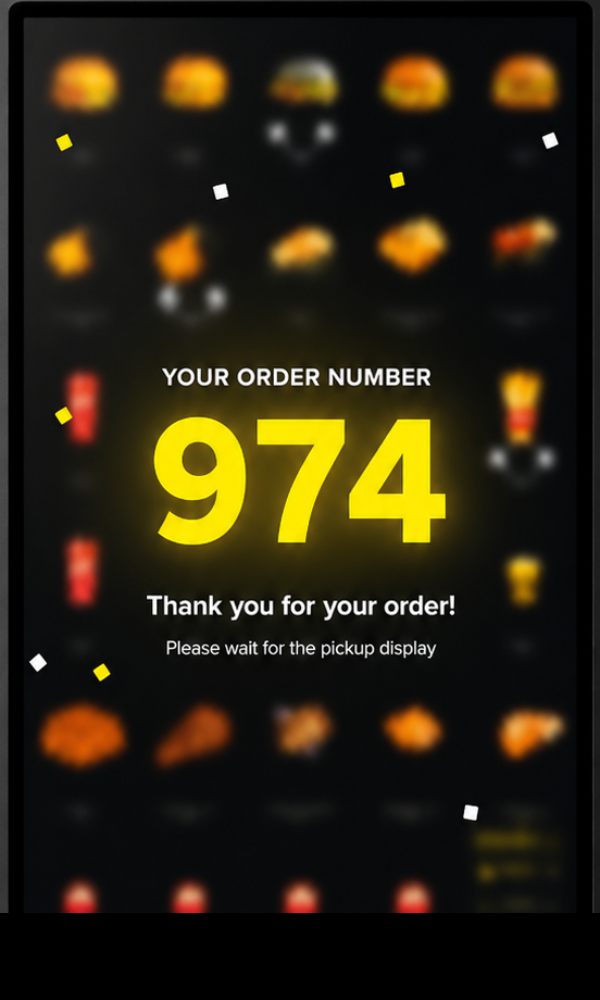
Order number 974
A large number for the board. Returns to start on a timer — the kiosk is ready for the next guest.
Module 02 · Admin panel

An admin panel
run by people, not IT

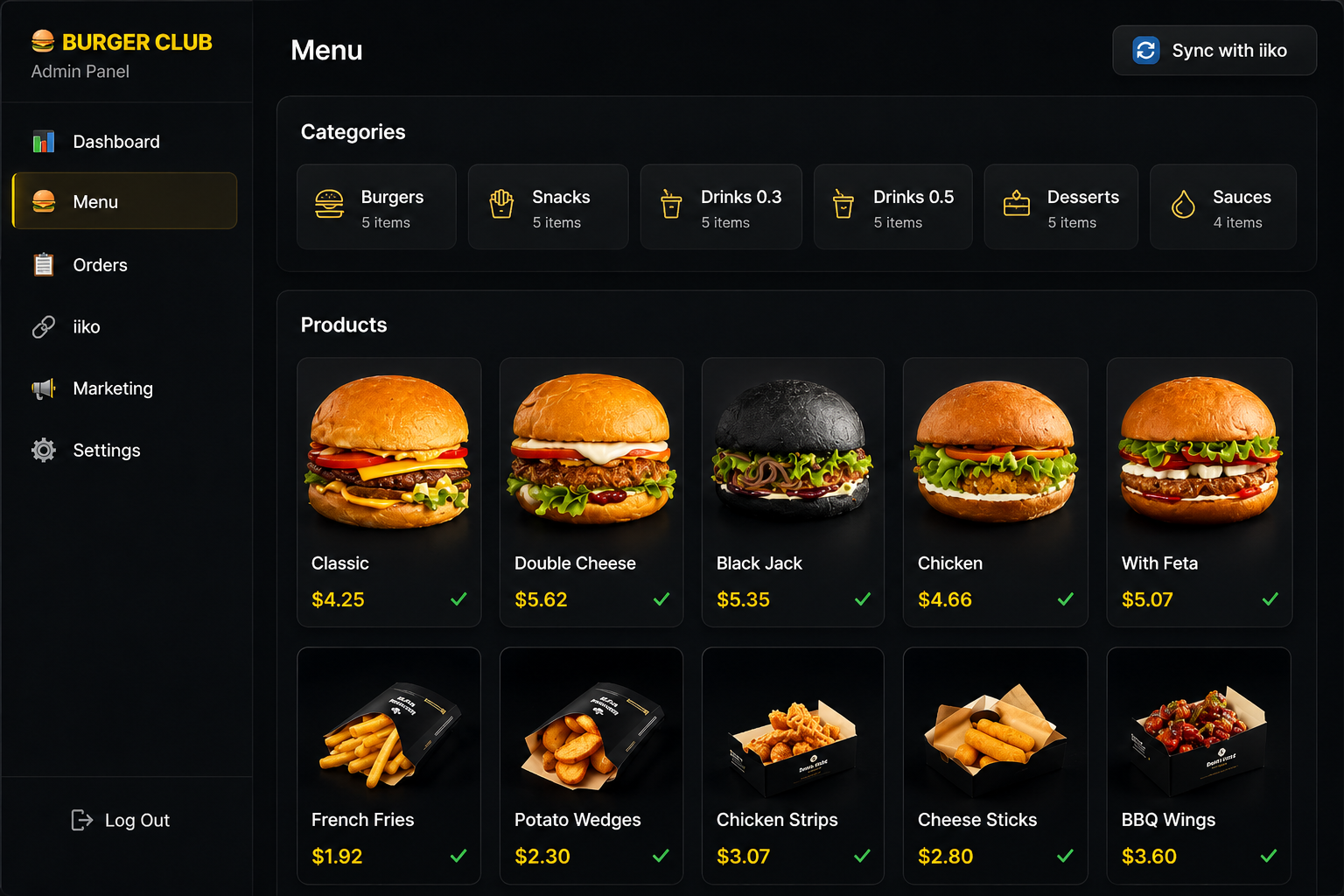
Burger Club staff manage menu, prices, item availability and marketing themselves — without developers. One big yellow Sync with iiko button pulls the catalog from the restaurant system in seconds.

  • Dashboard — revenue, average check, top items, kiosk load
  • Menu — categories, cards, photos, USD prices, stop-list, versions
  • Orders — kiosk order feed, statuses, audit, manual refund
  • iiko — integration settings, sync history, errors
  • Marketing — promo codes, start-screen banners, promotions
  • Settings — kiosks, branding, receipt templates, staff roles
admin.burgerclub.app/menu
Burger Club Admin Panel
Integration · iiko / ICA

The kiosk is part
of the restaurant system

The core principle: the kiosk doesn't live on its own. Menu, modifiers, stop-lists, prices — a single source of truth in iiko. Kiosk orders go to the same place as till and delivery orders, tagged source=kiosk.

iiko / ICA
Restaurant system
Sync
menu · prices · stop-lists
B
Backend
FastAPI · PostgreSQL · sync queue
Transfer
order · type · source
Kiosk & admin
React + TS · live menu, real orders
Menu import
Categories, items, modifiers, photos — in one request.
$
Price sync
Tier prices and discounts mirror the iiko configuration 1-to-1.
Live stop-list
An item runs out — the kiosk hides it within seconds.
Order transfer
Composition, service type, source, amount — into the restaurant feed.
Statuses
Created → Accepted → Ready → Closed — in sync with iiko.
Error handling
Retry queue, dead-letter, manager alert — without losses.
Manual sync
A Sync with iiko button in the admin panel for a forced refresh.
Audit log
Sync history with diff and timestamps for investigations.
Payment · fiscalization · loyalty

7 steps from order
to a fiscal receipt

A universal architecture is built in. Connecting specific providers (bank terminal, fiscal operator, loyalty program) is external, via configuration. The business changes its bank or fiscal operator — the code is untouched.

1
Order creation
Composition, type, source fixed in the DB.
2
Cart lock
Composition is frozen, prices recalculated.
3
Payment initiation
Payment session to the provider, amount, ID.
4
Awaiting response
Polling / webhook — success, decline, cancel.
5
Receipt printing
Composition, VAT, details → fiscal register.
6
Send to iiko
Order passed to the restaurant system.
7
Order number
The guest sees the order #, the board knows it.
/api/payments
Payment API
Create a session, check status, cancel. Adapters for any bank terminals.
create_sessionpollcancelrefund
/api/fiscal
Fiscal API
Building receipt data: item composition, totals, VAT, details, fiscal fields.
print_receiptz_reportofd_send
/api/loyalty
Loyalty API
Authorization by phone, balance, redemption/accrual of points, transaction history.
auth_phonebalancespendearn
Architecture · Technology stack

A stack built
for kiosk-mode

A Python (FastAPI) backend, React + TypeScript frontends. The kiosk is a regular web app running on a mini-PC in kiosk mode. PostgreSQL holds the data, Docker handles deployment.

Backend
Python + FastAPI
Business logic, orders, sync queues, APIs for kiosk and admin
Database
PostgreSQL
Products · orders · kiosks · iiko history · audit log
Kiosk frontend
React·TS
Adapted for a vertical touchscreen, kiosk-mode browser
Admin frontend
React·TS
A web app for staff, browser access
OS & runtime
Ubuntu LTS
Server Linux + Docker for containerization
Mini-PC
NUC/Win
Inside the kiosk — a mini-PC, Windows 10/11 or Linux, a browser in kiosk-mode
Integrations
iiko · ICA
Menu import, price sync, order transfer, statuses
External APIs
Payment·Fiscal
Programmatic interfaces for terminals, fiscal operators and the loyalty program
Burger Club kiosk
Touchscreen
32 – 55″ Full HD
Kiosk-mode
UI on React + TS
Payment module
NFC / chip / magstripe
Mini-PC inside
Windows / Linux
Brand stripe
Burger Club
Hardware

One design,
any kiosk

The software is designed to run on any vertical touchscreen kiosk with a Full HD screen and a mini-PC. Case size, a bill acceptor, a fiscal printer, an NFC pad — a matter of configuration, not code.

Screen
32 · 40 · 55″ Full HD
Orientation
Portrait, 9:16
Brain
Mini-PC / NUC
OS
Windows 10/11 · Linux
Network
LAN · iiko · Internet
Payment
NFC · chip · magstripe
Results · in numbers

In numbers

0
screens in the linear user journey
0
menu items on a single screen (5 × 6)
0sec
average time to place one order
0
system parts: kiosk, admin, backend
0
external APIs: iiko, payment, fiscal, loyalty, OFD
0sz
screen sizes supported: 32 / 40 / 55″
0%
price and menu sync with iiko
0
the "Sync" button — what the client wanted
Ready for your case?

Self-service,
frontends, backends,
integrations — turnkey

Kiosks, POS software, mobile and web apps, integrations with iiko and any ERP — for retail, food service, wellness and medicine.

Discuss a project
VITARUM
Software DevelopmentWeb ApplicationsMobile ApplicationsPortfolio
+7 (968) 199-93-28 · info@vitarum.net